
Is Fabric Copilot Actually Right for Your Business Right Now?
Talk to anyone running reports at a mid-sized company and you’ll hear some version of the same story. Too many spreadsheets. Dashboards that multiply every quarter. Someone, somewhere, is still writing SQL at 11pm because a client wants numbers by 9am. That’s basically the gap Microsoft Fabric Copilot was built to close, and it’s part of a shift a digital marketing agency has had to pay attention to as well, since client reporting and campaign analytics now run through exactly this kind of tooling more often than not.
We covered this shift in more depth in our piece on Microsoft Fabric consulting services from Aegis Softtech data analytics is one of the fastest-moving functions inside most businesses right now, and Copilot inside Fabric is a big part of why.
So what does it actually do, how does it fit into the wider platform, and is it worth the hype or just another AI feature bolted onto a product page? Let’s get into it.
What Fabric Copilot Actually Is?
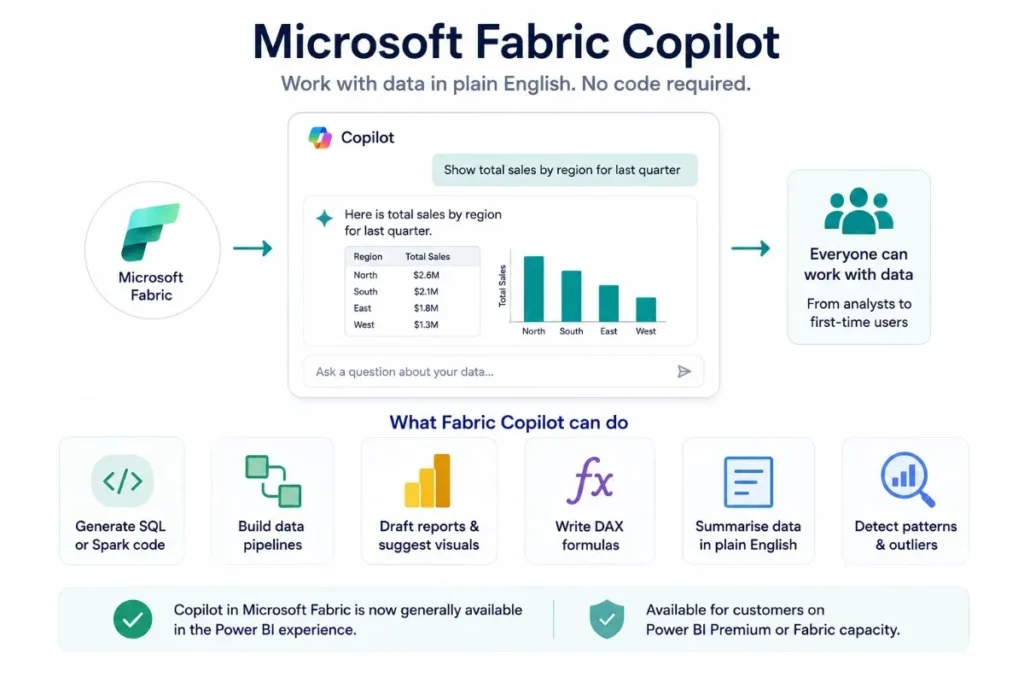
Fabric Copilot lives inside Microsoft Fabric and lets people work with data in plain English instead of code. You type a request roughly the way you’d say it out loud to a colleague, and it turns that into a query, a draft report, or a summary. No SQL required, if you don’t want to touch it.
It runs on large language models and reads context from whatever you’re already working on inside Fabric, so the suggestions aren’t just generic templates pulled from nowhere. It’s actually looking at the shape of your data before responding, which is more than most “AI-powered” tools bother doing.
A few things it handles decently:
- Turning a plain-language request into SQL or Spark code
- Building out data pipelines without much manual configuration
- Drafting Power BI reports and suggesting the visuals to go with them
- Writing DAX formulas honestly one of its stronger points
- Summarising large datasets into something a non-analyst can actually read without a translator
- Flagging patterns or outliers that might be worth a second look
There’s a democratisation angle worth mentioning too. Someone who’s never opened a query editor in their life can now ask a reasonable question of their data and get something usable back. That’s not a small thing, even if it sounds like a marketing copy when you say it out loud.
Microsoft confirmed Copilot in Fabric reached general availability starting with the Power BI experience, rolling out to customers on Power BI Premium or Fabric capacity. Worth noting, because it means Microsoft’s treating this as core functionality now, not some experimental toggle that quietly vanishes in a future update.
Want your data actually working for you, not just sitting in a dashboard nobody checks?
Getting from raw numbers to decisions that move the needle takes the right strategy, not just the right tools.
Explore Our ServiceHow It Actually Works, Step by Step?
The whole point behind Fabric AI is pulling analytics into one place so people stop bouncing between five different tools just to answer one business question. Everything happens inside Fabric itself, which sounds obvious until you remember how most companies’ data stacks actually look.
Roughly, here’s the flow:
You type something in plain language. “Show me the monthly sales trend for the last two quarters.” Or “write SQL to find our top-selling products this year.” Nothing fancy, no special syntax to memorise.
Copilot writes the response optimized code in whatever language fits, SQL, DAX, Python, Spark, whatever the task calls for. Fast enough that a lot of the manual grunt work just disappears.
It also suggests what’s relevant given the data it can see. Visualisations, calculations, transformations that actually make sense in context rather than a generic template thrown at every request.
And it improves the more you use it. Suggestions get sharper over time as it picks up patterns in how your team actually works with data, not a huge leap technically, but it does make a real difference after a few weeks.
Microsoft’s own Fabric documentation describes the whole thing as an end-to-end analytics platform: data engineering, warehousing, real-time intelligence, BI, all sitting on a shared storage layer called OneLake. Copilot’s layered across all of it, not bolted onto one corner of the product.
Where Does a Copilot Actually Add Value?
There’s a real gap between “AI feature exists” and “AI feature is worth your time,” and Fabric Copilot mostly lands on the right side of that line. Here’s roughly where the marketing pitch matches reality:
| Task | What Copilot Promises | What It Delivers in Practice |
| Report building | Instant, polished dashboards from a prompt | Solid first draft, still needs manual polish |
| SQL/Spark code | Zero manual coding required | Genuinely strong, minor edits usually needed |
| Data summarisation | Executive-ready insight summaries | Good for spotting trends, weak on nuance |
| DAX formulas | Complex formulas from plain English | One of its most reliable capabilities |
| Data cleaning | Fully automated prep | Handles repetitive tasks, not judgment calls |
None of this replaces a data analyst, and it’s not supposed to. It just clears away a lot of the tedious groundwork so that person spends time on actual decisions instead of syntax debugging at midnight.
Where AI-Driven Analytics Is Actually Headed?
This isn’t really a Microsoft story specifically. It’s part of a bigger shift across the industry. Analytics teams are expected to move faster with fewer people, and AI tools are how that gap gets closed in practice rather than in theory.
A few shifts worth keeping an eye on:
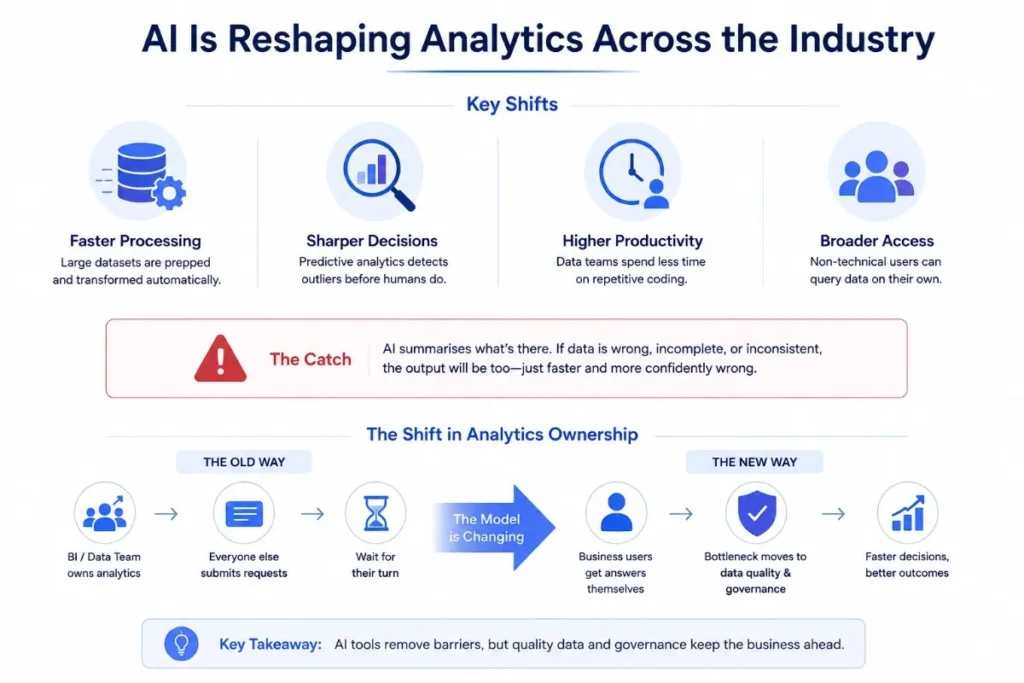
- Faster processing of large datasets, since prep and transformation get mostly automated now
- Sharper decision-making, since predictive analytics can flag outliers before a human even clocks them
- Higher productivity for data teams, who spend noticeably less time on repetitive coding work
- Broader access across a company, since non-technical staff can query data without waiting days for an analyst to get to it
The catch, and it’s a real one, none of this works if the underlying data’s a mess. Copilot summarises whatever’s there. If what’s there is wrong, incomplete, or inconsistent, the output will be too. Just faster, and more confidently wrong, which is arguably worse than slow and obviously wrong.
There’s also a quieter shift in who “owns” analytics inside a company. Used to be that sat squarely with a dedicated BI or data team, and everyone else filed a request and waited their turn. That model’s cracking. When a marketing manager can pull their own campaign trend report without opening a ticket, the bottleneck just moves usually to data quality and governance, not headcount. Most businesses haven’t fully caught up to that yet, and honestly, a lot of them don’t realise the bottleneck’s movement until something goes wrong.
Real Use Cases Worth Knowing:
Fabric Copilot shows up across a fair spread of business functions, not tucked into one narrow corner of analytics.
Business intelligence: Teams build interactive dashboards straight from plain-language requests instead of waiting on a BI specialist for every small tweak someone wants.
Data engineering: Copilot writes SQL, Spark, or Python for pipeline automation, cutting down on the manual scripting that used to eat most of an engineer’s week.
Financial reporting: Income, expenditure, and trend analysis get automated to a decent degree, speeding up forecasting cycles that used to drag on for days.
Sales and marketing analytics: Customer behaviour and campaign performance surface faster, which matters a lot for teams running paid media, where timing genuinely affects how spend decisions get made.
Supply chain management: Demand forecasting and stock movement predictions get sharper, with a lot less manual number-crunching involved.
Customer support analytics: Common complaint patterns and service quality issues surface faster than they would through someone manually reviewing tickets one at a time.
There’s a quieter use case for product and app analytics. Businesses running their own mobile app development projects increasingly want in-app behaviour data feeding straight into reporting, rather than sitting in some separate system nobody checks until something’s already gone wrong.
Getting the Most Out of It:
A handful of practices genuinely change how useful Copilot ends up being for a team.
Start with clean data. No AI tool fixes bad data quality garbage in, garbage out still applies, arguably more so now that the output looks polished enough to trust without a second glance.
Write specific prompts. Vague requests get vague answers back. The more detail you put into the task, the more usable what comes out actually is.
Always validate results. Treat whatever Copilot hands you SQL, reports, summaries as a strong first draft, not something ready to ship straight to a client or an executive.
Set up proper governance early. Role-based access and clear data ownership matter more, not less, once AI tools start pulling insights out of sensitive business data.
What It Doesn’t Do Well (Yet)?
Worth being upfront about the limits. Copilot’s output quality depends entirely on the data feeding it, so a messy dataset produces messy insights no matter how good the underlying AI is. It’s also not a stand-in for human judgment. Critical business calls still need a person actually looking at the numbers, not just nodding along to whatever the AI summarised.
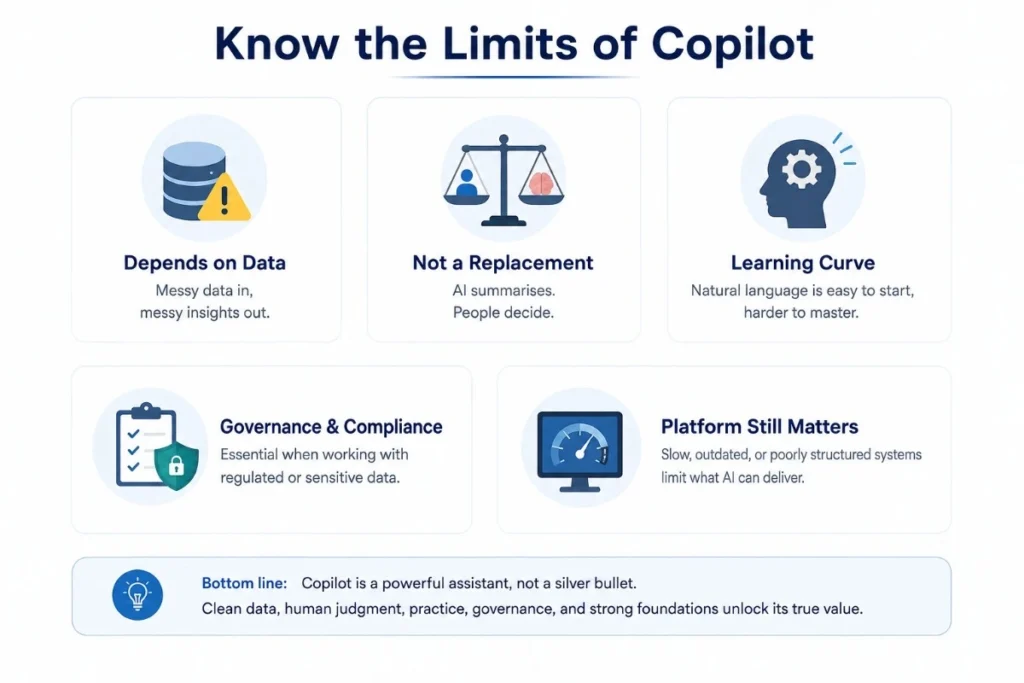
Teams also tend to underestimate the learning curve. Natural language interfaces feel intuitive the first time you try one, but getting genuinely useful output out of Copilot still takes some practice figuring out how to phrase things so it understands what you actually want, not just what you literally typed. And once AI tools are touching regulated or sensitive data, governance and compliance stop being optional extras.
It’s also worth flagging that Copilot’s only as good as the platform sitting underneath it. A business running its analytics on top of a slow, outdated, or badly structured website or web application tends to hit friction long before Copilot itself becomes the bottleneck; the underlying infrastructure ends up capping what any AI tool can realistically pull together, no matter how smart it is on paper.
Why Does This Usually Need Expert Setup?
Getting real value out of Microsoft Fabric, and Copilot specifically, generally isn’t a plug-and-play exercise for most mid-sized businesses. It needs the right architecture, proper integration with whatever systems already exist, and a governance layer that doesn’t fall apart the first time someone runs a sensitive query.
That’s the gap Microsoft Fabric consulting services from Aegis Softtech are built to close everything from readiness assessments and architecture design through to governance and cost optimisation, so businesses aren’t just bolting Fabric onto a messy existing setup and hoping for the best.
For businesses whose real bottleneck isn’t the data platform itself but how that data eventually shows up in campaign reporting, client dashboards, or performance marketing decisions, that’s closer to what a performance marketing agency in Ahmedabad typically handles turning raw numbers into decisions that actually move a business forward, not just prettier charts.
Final Thoughts
Microsoft Fabric Copilot genuinely changes the day-to-day of working with data less typing, faster answers, more people able to ask questions of a dataset without needing a specialist standing by. It’s not magic, and it’s not a substitute for solid data hygiene or actual human judgment. But for teams drowning in manual reporting, it’s a real step forward. Not just another AI feature bolted onto a product for the sake of a press release.